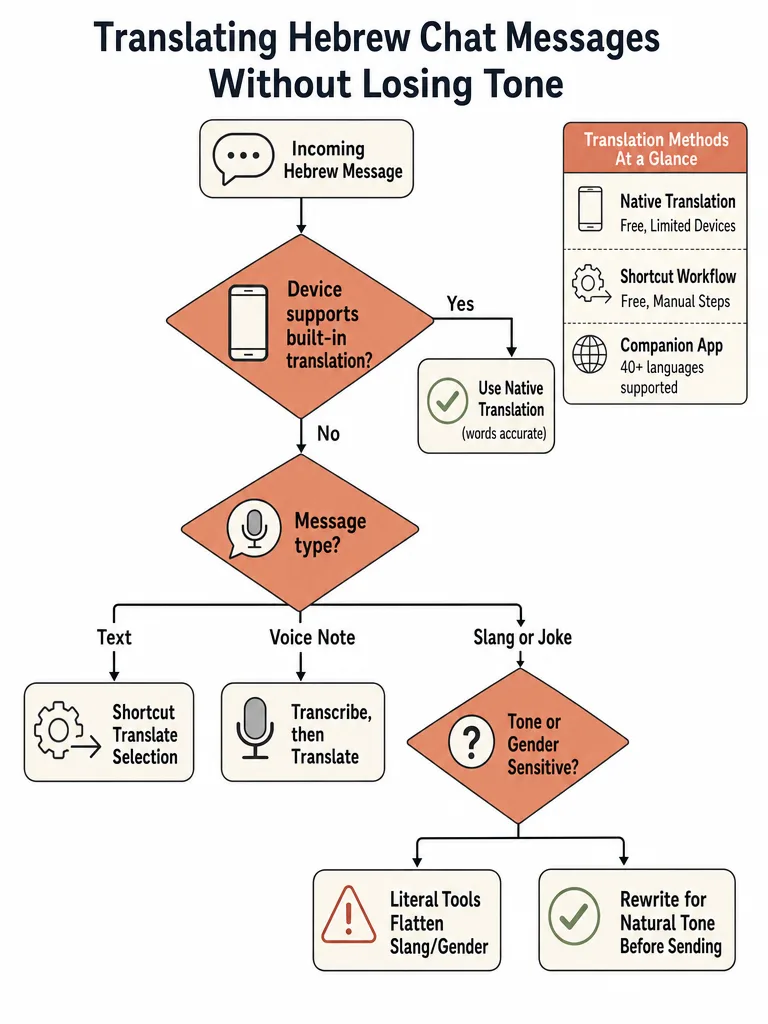
Translate Hebrew WhatsApp messages with the right method, then check slang, sarcasm, and gender before you send your reply.
How Do You Translate Hebrew WhatsApp Messages Without Losing the Tone?
Translating Hebrew WhatsApp messages without losing tone comes down to matching the method to the message, then checking the result yourself. Native WhatsApp translation, iPhone shortcuts, and apps like WhatLingo all convert the words, but none of the available documentation shows how well any of them handle Hebrew slang, sarcasm, or gendered phrasing.
Each method has a different failure point. Native translation depends on whether WhatsApp has rolled the feature out to your specific device. The iPhone shortcut translates one message at a time with no sense of who's texting whom. WhatLingo translates a full thread automatically, but it still requires connecting your WhatsApp account, according to its own App Store listing. None of these are built to flag a sentence that technically translates correctly but reads stiff, overly formal, or off in tone for a casual chat.
That's the gap worth closing yourself: before you send a reply, check whether it actually sounds like something a person would text, not a form letter. Treat Hebrew WhatsApp translation as a tone problem you review, not just a button you tap.
Does WhatsApp Have a Built-In Hebrew Translator?
WhatsApp's own Help Center defines message translation as a feature that "is only available on certain devices and may not be available to you yet." That's the real answer to whether built-in Hebrew translation works on your phone: it depends on device and app version, not a setting you can switch on.
WhatsApp recommends keeping the app updated so the feature arrives as soon as it reaches your device, but its public documentation doesn't specify which devices get it first or confirm Hebrew's place in that rollout. In practice, that means some WhatsApp users already have a built-in translate option and others don't, with no visible way to request it sooner.
How Do You Translate WhatsApp Messages on iPhone Without Copying and Pasting?
iPhone doesn't ship a native in-app translator inside WhatsApp, according to a documented workaround from TexMexExpats, so the fastest way to read a Hebrew message without leaving the app is Apple's Shortcuts app paired with WhatsApp's share sheet. The Translate Selection shortcut pulls up a translation in a popover without switching screens or copying text.
Open the Shortcuts app on your iPhone and go to the Gallery.
Search for "Translate Selection" and add it to your list of shortcuts.
Inside WhatsApp, hold down on the Hebrew message, tap Forward, then tap the Share icon, and select Translate Selection.
The translation appears in a popover right there, without leaving the chat thread.
If Translate Selection doesn't show up in the share sheet, scroll to the bottom, tap Edit Actions, and add it manually.
This gets you a clean, per-message translation with no copy-paste and no app-switching. It still works one message at a time, so a fast-moving group chat means repeating the steps for each new message that needs it.
Native Translation vs iPhone Shortcuts vs Apps Like WhatLingo: Which Wins for Hebrew on WhatsApp?
Native WhatsApp translation, Apple's iPhone shortcut, and the companion app WhatLingo solve Hebrew WhatsApp translation three different ways, and none wins outright. Native translation and the shortcut are free and never touch your account, but depend on device rollout or handle one message at a time. WhatLingo translates full threads automatically, but it requires connecting your WhatsApp account, according to its own App Store listing.
WhatLingo, built by Whitespectre SLU, holds a 4.7-star rating from 173 ratings on the Apple App Store and says it supports more than 40 languages, including Hebrew, with a 7-day free trial. Reading translated messages is free; sending translated replies requires a subscription, per the same listing.
Method
Cost
Account access
Reply handling
Native WhatsApp translation
Free
Stays inside WhatsApp
Depends on device rollout; translates per WhatsApp's own description
iPhone Shortcuts (Translate Selection)
Free
Runs through Apple's share sheet, no account connection
One message at a time, via popover
WhatLingo
Free to read, subscription to send, 7-day trial
Connects to your WhatsApp account, per its listing
Real-time across 40+ languages; says messages aren't stored
A separate app, Hashti, is sometimes mentioned alongside WhatsApp translators, but its own product page describes live translation inside Hashti's own rooms and private chats, priced at $4.99 a month or $39.99 a year for about 250 translated messages a day. Nothing in that description ties it to WhatsApp, so it isn't a WhatsApp companion option.
Can WhatsApp Translate Hebrew Voice Messages?
Available sources don't confirm whether WhatsApp translates Hebrew voice messages directly inside the app. The documented workaround, from TexMexExpats, transcribes the audio into text first using a Shortcuts automation, then runs that transcript through a translation step rather than translating speech directly.
Run the voice note through a transcription shortcut; the documented iOS workflow routes the audio to ChatGPT's API for speech-to-text.
The transcription comes back in the language the message was spoken in, so a Hebrew voice note returns Hebrew text.
Feed that Hebrew transcript through a second step, such as the same Translate Selection shortcut used for text messages, to get an English version.
Read the translated transcript instead of replaying a fast or heavily accented Hebrew voice note several times.
The transcription step isn't free, but it's close: TexMexExpats estimates the ChatGPT API cost at around $0.006 per minute of audio, and reports adding $10 to an API account and still having most of it left after more than a month of regular use. Separately, WhatLingo's own App Store listing lists "translation of voice messages" among its features, though it describes that as part of its own app rather than a native WhatsApp capability.
How Do You Keep Hebrew Slang and Jokes From Getting Lost in Translation?
Hebrew slang and jokes are a tone problem, not a vocabulary problem, and the sources reviewed here don't measure how accurately any WhatsApp translation method handles Hebrew slang, sarcasm, or casual register. The closest sourced data point comes from Hashti, a live-translation chat app that isn't tied to WhatsApp, which markets its own AI model specifically on this issue, saying it keeps tone intact: "slang stays slang, a joke stays a joke," inside its own rooms and chats.
That's one app's claim about itself, not a benchmark across the methods covered above. Without measured comparisons, the safer approach is to treat any translated Hebrew message as a draft: read it back and ask whether the phrasing matches how a friend, coworker, or neighbor would actually talk, not whether every word is technically correct.
A technically accurate translation can still misrepresent a joke or a casual remark if nobody checks the tone. If slang-heavy chats come up often, translating Hebrew slang without sounding robotic covers the practical approach to reading meaning over literal words.
How Do You Avoid Getting Hebrew Gender Wrong When You Reply?
Hebrew verbs, adjectives, and some nouns change form based on who's speaking and who's being addressed, so the same English sentence can need different Hebrew forms depending on the genders involved in the conversation. None of the sources reviewed here, covering native WhatsApp translation, the iPhone shortcut, or WhatLingo, measure how any of those methods handle that gender agreement when generating a reply.
That gap matters more in Hebrew than in languages where gender barely touches grammar. A reply that gets the verb or adjective form wrong can read as addressed to the wrong person, or simply off, without it being obvious why. Since the available research doesn't confirm how any tool handles this, the practical step is to read a translated Hebrew reply back and check whether the forms match who you're actually talking to before sending it. How gender works in Hebrew translation walks through the practical forms for "you," "they," and mixed groups.
How Do You Choose the Right Method for Translating Hebrew WhatsApp Chats?
Choosing a method comes down to three questions: is native translation available on your device, how much of the conversation needs translating, and whether slang or gender accuracy matters enough that you'll review the output by hand. Matching those answers to a method beats defaulting to whichever app happens to already be installed.
Start with native WhatsApp translation if it's available on your device; it's free and keeps the conversation inside WhatsApp.
If native translation isn't available and you're on iPhone, set up the Translate Selection shortcut for occasional messages.
If you're translating a full, fast-moving thread rather than occasional messages, a companion app like WhatLingo saves time, at the cost of connecting your account and, past the free reading tier, a subscription to send replies.
If the chat involves Hebrew slang, jokes, or replies where gender needs to match the person you're talking to, treat any of the above as a first draft and review it for tone with a sentence-level tool like baba Hebrew Translator before sending.
Does WhatsApp's Hebrew translation feature work the same way on Android and iPhone?
No, availability differs by device rather than operating system, and WhatsApp's own Help Center says translation "is only available on certain devices and may not be available to you yet." Some Android users report an in-keyboard translate option that appears after tapping three dots and selecting Hebrew, per a Secret Tel Aviv Facebook group post, while iPhone has no native option yet and relies on a Shortcuts workaround instead.
Is Hashti a WhatsApp translation app?
No, Hashti is a separate live-translation chat app for its own rooms and private chats, not a WhatsApp companion. It costs $4.99 a month or $39.99 a year and covers about 250 translated messages per day, according to its own product page. Hebrew is one of its listed languages, but nothing in its description ties the app to translating inside WhatsApp itself.
How much does it cost to transcribe and translate a Hebrew WhatsApp voice message on iPhone?
Roughly $0.006 per minute of audio, using the ChatGPT API inside a documented iOS Shortcuts workflow from TexMexExpats that first transcribes the Hebrew voice note, then runs the text through a translation step. One user who set this up reported adding $10 to their API account and still having most of it left after more than a month of regular use. It's a two-step shortcut, not a WhatsApp built-in feature.
Can you auto-translate every Hebrew WhatsApp message without tapping anything each time?
Yes, but only with WhatLingo among the documented methods, which translates incoming and outgoing WhatsApp messages in real time once connected, according to its own App Store listing. Native translation and the iPhone Translate Selection shortcut both require a per-message tap instead. Reading translated messages through WhatLingo is free; sending translated replies needs a subscription after a 7-day trial, and the app requires connecting your WhatsApp account.
Can baba Hebrew Translator translate messages directly inside WhatsApp?
No, baba isn't built into WhatsApp; it works as a separate web app, mobile app, and Chrome extension you use alongside it. The practical workflow is to translate or draft the Hebrew message with whatever method you're using, then paste it into baba to check tone and gender agreement before sending the corrected version back in the chat, rather than relying on a single auto-translated output.
What's the biggest risk of trusting a WhatsApp translation tool with Hebrew slang?
The biggest risk is a reply that's technically accurate but tonally wrong, stiff, overly formal, or mismatched to the people involved, since none of the major WhatsApp translation methods document how well they handle Hebrew slang or sarcasm. Hashti, a separate chat app, markets its own model as preserving tone, saying "slang stays slang, a joke stays a joke," but that's a claim about itself, not a measured benchmark across WhatsApp tools.