Translate Hebrew website pages in Chrome, with inline tooltips, full-page reading, and PDF-aware handling that keeps gender, slang, and RTL context.
What is the best way to translate Hebrew websites without losing context?
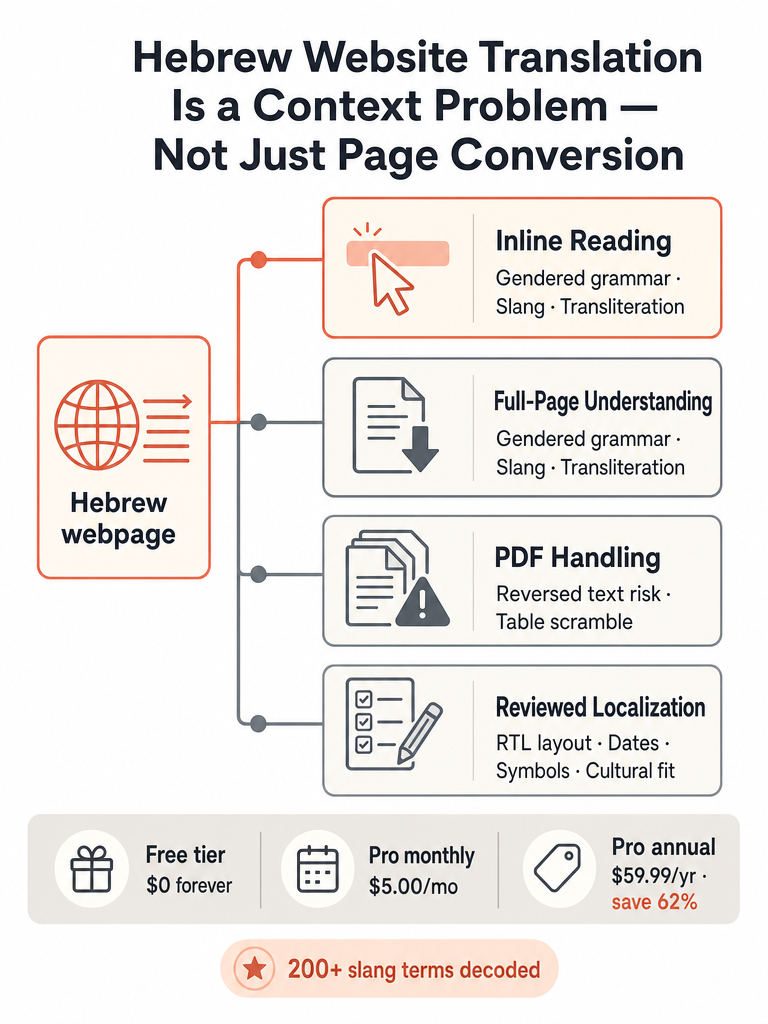
The best way to translate a Hebrew website depends on the job: inline reading for a paragraph or two, full-page conversion to understand an entire article, careful handling for PDFs, or a reviewed workflow before you publish anything. Hebrew website translation is a context problem, not just word-swapping. Hever Translations describes the process as localization, which covers translating files like HTML, XML, and JSON while handling right-to-left and left-to-right directionality.
One tool rarely fits every situation because of what Hebrew hides. Grammatical gender changes verbs and adjectives depending on who speaks and who listens. Slang and idioms sit in almost every casual text. Most non-liturgical Hebrew is written without vowels, which, as one Living in Israel guide on Medium notes, adds a real layer of difficulty for anyone reading unfamiliar words. Add RTL layout, dates, and symbols, and a literal render can technically be "translated" while still making no sense.
So match the tool to the task:
Reading a few lines on a page: highlight-to-translate, inline.
Understanding a whole article: full-page translation.
Documents with structure: PDF-aware handling, not copy-paste.
Anything you'll publish: machine draft plus human review.
The gap most generic pages leave open is treating all four as one job. They aren't, and picking the wrong one is how context gets lost.
Yes, you can translate a Hebrew website in Chrome using a browser extension, and it works on the pages you actually use daily. The baba Hebrew Translator Chrome extension translates Hebrew text on any webpage without copy-paste or tab switching. Its extension page says it works on Israeli news sites, government sites, social media, PDF viewers, and email.
That coverage matters because Hebrew doesn't stay in one place. You hit it on a municipal parking notice at midnight, a bank email, a WhatsApp Web thread, or a Ynet headline. A browser tool that only handles clean article text leaves you stuck the moment the Hebrew shows up inside a form, a comment, or an inbox.
Reading in place also protects meaning that a raw page conversion drops. The baba extension shows grammatical gender and pronunciation alongside the translation, so you're not guessing whether a verb was addressed to a man or a woman, and you can sound out a word you can't yet read.
If you mainly need to read Israeli sites in the browser, it's worth comparing your options before you install anything. Our guide to the best Hebrew Chrome extension for reading Israeli sites walks through translation, text-to-speech, and readability tools so you pick the right one.
How do I translate any Hebrew text on a webpage without copy-paste?
Highlight the Hebrew text and the translation appears in place, with no copying or tab switching. The baba Chrome extension shows an inline tooltip with the translation, pronunciation, and grammatical gender right after you highlight Hebrew text on a webpage. That keeps the surrounding page context intact, which is exactly what gets lost when you paste a snippet into a separate tool.
Inline reading solves a specific Hebrew problem. Pull a sentence out of its page and you lose the cues that tell you who's speaking and in what tone. Keep it in place and the translator can weigh the surrounding text before it commits to a gender form or a register.
The extension goes deeper than the tooltip. Its side panel adds slang definitions, cultural context, alternative forms, and full-sentence summaries, and the extension page says it decodes 200+ slang terms. That's the layer literal tools skip: a word like סבבה or תכלס rarely survives a straight render, and a summary helps when the sentence runs long.
If pronunciation is your main hurdle, a translator with transliteration built in shows the Hebrew sounds in English letters. Our Hebrew transliteration guide for English speakers explains when to read for sound versus letters.
Can I translate a whole website or just selected Hebrew text?
You can do both, and the right choice depends on how much you're reading. Selected-text translation, the highlight-and-tooltip method, fits a headline, a form label, or a single paragraph. Full-page translation fits a whole article you want to read top to bottom. On baba's Chrome extension, the free plan handles highlight-to-translate and inline tooltips, while full-page article translation is a Pro feature.
Everything in Free, plus full-page article translation and unlimited translations
Pro (annual)
$59.99/yr
Same as monthly, billed yearly to save 62%
The practical rule: if you're skimming a page and only a few lines matter, the free tooltip is enough. If you're reading a full Israeli news piece or a long government notice end to end, full-page translation saves you from highlighting line by line.
Does website translation handle Hebrew right-to-left formatting?
Good Hebrew website translation treats right-to-left layout as part of the work, not an afterthought. Hever Translations describes website translation as localization, which includes handling HTML, XML, and JSON files along with right-to-left and left-to-right directionality. Text direction is where many generic conversions visibly break, mixing Hebrew and English on the same line into scrambled order.
Direction is only the start. Hever Translations says website localization also means adapting graphic and visual elements: date formats, symbols, names, addresses, colors, and illustrations for the target audience. A date written as an Israeli sees it, a phone number, or an address block can all read wrong after a straight text swap, even when every word translated correctly.
For a reader using a browser extension, this is less of a worry. The tooltip and side panel sit on top of the original page, so the site's own RTL layout stays put while you read the meaning. The formatting fight is mostly a problem for teams rebuilding a site in a new language.
A page can have perfect word-for-word translation and still be broken if the direction, dates, and layout weren't localized. That's the difference between converting text and localizing a site.
If you're planning a full site conversion rather than just reading one, treat it as a project. Our guide to Hebrew website localization without raw-MT cleanup shows how language, RTL layout, tone, and QA fit together before launch.
How do I translate Hebrew PDFs without breaking the layout?
Translate Hebrew PDFs with a document-aware tool, not by copy-pasting text into a translator. Kovetz warns that copying Hebrew text out of PDFs can reverse text, mix paragraphs, and scramble tables, which creates cleanup work before you even start translating. The longer the file, the worse it gets: Kovetz says a 20-page PDF translated by text copying can require substantial manual rebuilding.
That's the trap with Hebrew documents. The words might paste out fine one moment and land in reverse order the next, and a table that looked clean on screen turns into jumbled cells. You end up fixing structure instead of reading content.
Automatic PDF translation still has a real place. Kovetz says it's useful for reading, summarizing, and understanding documents. The baba extension page lists PDF viewers among the places its browser tool works, so you can read a Hebrew PDF in place rather than wrestling it into another app.
Where automatic translation stops being enough is decisions with stakes. Kovetz says that for legally binding documents or medical reports, automatic translation is a starting point rather than an endpoint. Read the gist, then get a human on anything you'll sign or act on medically.
For scanned forms and official Hebrew documents specifically, our guide to translating Hebrew forms and government websites covers verifying every deadline, amount, and eligibility line before you act.
When is instant translation enough, and when does Hebrew content need review?
Instant translation is enough when you just need to understand something, and review is needed when someone acts on it. For reading a sign, a chat, or a news headline, an inline tooltip or full-page translation does the job. Kovetz frames automatic translation as a starting point rather than an endpoint for legally binding documents and medical reports, which is the clean line between the two.
Here's a practical decision rule by content type:
Hebrew content
Instant translation
Needs human review
Street signs, menus
Yes
No
WhatsApp chats, social posts
Yes
No
General news and article reading
Yes
Rarely
Forms and applications
For understanding
Before submitting
Legal documents, contracts
For the gist
Yes
Medical reports
For the gist
Yes
Published or business pages
Draft only
Yes
The pattern: the higher the cost of being wrong, the more a human belongs in the loop. A misread menu costs you the wrong dish. A misread contract clause or dosage costs a lot more.
How should teams review Hebrew website translation before publishing?
Teams should review Hebrew website translation through defined checkpoints before anything goes live, not treat machine output as final. Smartcat describes translating a Hebrew-to-English website as adding the site, reviewing translations in an editor, then previewing and publishing. That review step is where fluent-but-wrong Hebrew gets caught before readers see it.
A practical publishing checklist:
Draft with a Hebrew-aware translator so gender, slang, and register start closer to right.
Review in an editor, comparing source and translation side by side, as Smartcat's workflow describes.
Check RTL and layout, confirming direction, dates, and mixed Hebrew-English text render correctly, the localization elements Hever Translations flags.
Lock terminology, keeping product names and key terms consistent across pages.
Confirm cultural fit, checking tone and idioms read naturally to a native speaker.
Preview, then publish once the page reads as if written, not converted.
Smartcat claims its platform can pair AI translation with expert human review for 100% quality control and produce 95%+ AI quality, and that website translation can cut localization costs by up to 90% and speed launch by 50%. Treat these as vendor figures, but the shape is right: draft fast with AI, then let humans own the final pass. That review step is what separates published Hebrew that reads native from raw machine output that reads translated.
best alternatives to google translate for english to hebrew
baba Hebrew Translator is the strongest alternative for natural Hebrew output, asking who is speaking and who is listening and conjugating the verb for that context rather than defaulting to masculine forms the way generic tools do. It resolves all 7 Hebrew gender contexts — speaker, listener, mixed groups, and formal/informal register — before generating output. DeepL added Hebrew more recently than its major European language pairs and has no gender-aware translation at all.
best google translate alternatives for hebrew gender accuracy
Gender accuracy is where generic tools fail most visibly: tools like DeepL, ChatGPT, and Claude all default to masculine and have no mechanism for users to specify gender context. baba resolves all 7 Hebrew gender contexts before output, asking who is speaking and who is listening and conjugating for that context instead of defaulting to a single masculine form. For any sentence addressed to a woman or a mixed group, that gap matters immediately.
which hebrew translator is better than google translate for natural hebrew
A Hebrew-first translator built around gender resolution, slang, and Israeli idiom beats generic tools for natural output. baba is described as the only consumer translator reliably handling Hebrew gender across speaker, listener, and subject while also producing native-sounding Israeli phrasing. Slang terms like סבבה and תכלס, which appear in almost every text exchange, survive the translation instead of getting rendered literally or dropped.
does deepl support hebrew translation accurately
DeepL added Hebrew in 2022 and handles formal documents reasonably well, but Hebrew support lags behind its longer-established European language pairs. The core problems: no gender-aware translation, no transliteration, no nikud, and no camera or voice input. Its output often sounds too formal and translates idioms awkwardly. For getting the gist of a structured document it's workable; for natural Hebrew conversation or slang, it consistently falls short.
how do I translate a hebrew website in my browser without copy-paste
A browser extension lets you highlight Hebrew text on any webpage and get the translation in place, with no tab switching. baba's Chrome extension works across Israeli news sites, government pages, social media, PDF viewers, and email — covering the places Hebrew actually shows up in daily life. The inline tooltip shows the translation, transliteration, and grammatical gender right on the page, so the surrounding context stays intact and you can tell whether a verb was addressed to a man or a woman.
when does hebrew website translation need human review vs instant AI output
Instant translation is enough when you're reading — a sign, a chat, a news article. Human review belongs in the loop when someone acts on the content. Automatically translated legally binding documents and medical reports are a starting point, not an endpoint: machine output can read fluently and still get a gender form, a legal term, or a dosage wrong. Published or business-facing Hebrew content also needs a reviewer before it goes live, regardless of how polished the draft looks.