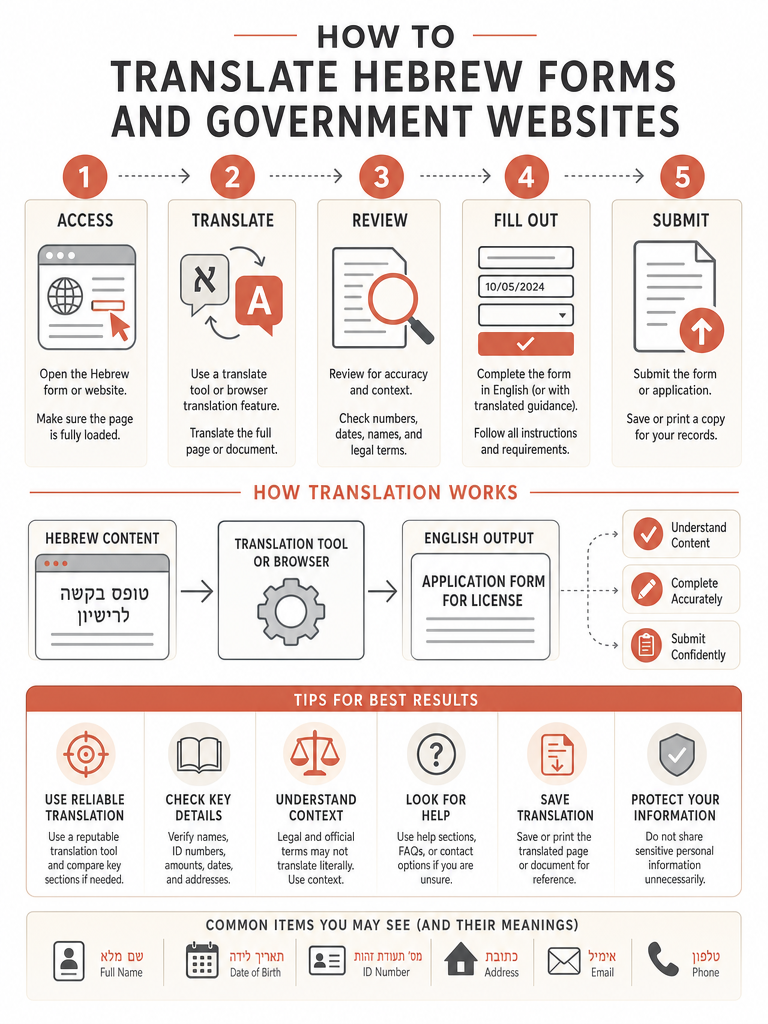
Translate Hebrew forms and government websites by sentences, preserve structure, check gender, and verify dates, amounts, and instructions before you act.
What is the safest way to translate a Hebrew form or government website?
The safest workflow for a Hebrew form is to translate full sentences, preserve the original structure, check context and gender, then verify anything official before you act on it. A literal word swap is where most mistakes start, because Hebrew grammar, word order, and roots don't map cleanly onto English. Accurate Hebrew-to-English translation depends on strong editing, natural phrasing, and review against the original text (Source: MotaWord).
Here's the order that works for paperwork that actually matters:
Translate at the sentence level, not word by word. Hebrew word order is more flexible than English, so a phrase-by-phrase swap often reads as awkward or misleading (Source: MotaWord).
Keep the structure intact. Headings, numbered clauses, and tables should survive the translation so you can cross-check each section against the Hebrew original.
Check the gender. Hebrew verbs and pronouns shift by gender, which changes who a sentence is addressing or describing.
Verify the high-stakes parts. Deadlines, amounts, eligibility, and submission instructions deserve a second look before you sign or reply.
The baba Hebrew Translator was built around this kind of document, with gender-aware translation and 2,700+ HebrewCore prompts trained on Israeli legal, business, and governmental writing (Source: baba). For everyday signs and chats you can move fast. For a Bituach Leumi letter or an immigration form, slow down at step four.
What changes when the Hebrew is on a government website instead of a PDF?
A government website and a downloaded form need different handling: web pages translate in place as live text, while a PDF or scanned letter needs document translation that holds its layout together. Live text on a site is selectable, so it moves through a translator cleanly. A form, by contrast, often carries structure—numbered clauses, signature blocks, tables—that you need to keep intact to make sense of it.
Public detail on translating specific Israeli government portals is limited as of this writing, so treat any official site as a starting point, not a final answer. The practical move is the same either way: get the full sentences into English, then confirm the exact wording on anything tied to a deadline, payment, or eligibility.
When a form lives as a downloadable file rather than a web page, the Hebrew PDF translation workflow covers the document side—OCR, layout, and clause structure—in more depth.
How do you translate scanned Hebrew forms and image-based PDFs?
Scanned and photographed Hebrew documents need OCR before any translation can work, because the text is locked inside an image and a translator can't read pixels. Photographed pages, faxed contracts, and image-based PDFs all fall into this category. Without OCR, you get nothing usable—or you end up retyping Hebrew by hand, which invites errors.
The baba Hebrew PDF Translator runs photographed pages, faxed contracts, and image-based PDFs through Hebrew-tuned OCR before translation, and right-to-left layout, vowel marks, and dense legal type survive the pipeline (Source: baba). That last part matters more than it sounds. Generic OCR often garbles right-to-left text or drops vowel marks, and once the recognition is wrong, the translation can't recover.
A few cues tell you OCR is needed:
You can't select or highlight the text with your cursor.
The file is a photo from your phone or a fax printout.
The PDF was scanned from a physical letter rather than exported from software.
baba handles Hebrew PDFs up to 20 pages and 50 MB, including scanned files, and it's free to start on iOS and Android with no login required (Source: baba).
How do you keep right-to-left layout, tables, and numbered clauses readable?
Layout preservation matters because a Hebrew form's meaning lives in its structure—which clause sits under which heading, which row matches which column. When translation flattens all of that into a wall of text, you lose the ability to check the English against the Hebrew section by section. For a contract or an official letter, that cross-reference is the whole point.
The baba Hebrew PDF Translator preserves headings, numbered clauses, bullet hierarchies, and tables so legal and business documents stay readable, letting you cross-reference the translated contract against the Hebrew original (Source: baba). Right-to-left layout, the trickiest part for most tools, comes through intact along with vowel marks (Source: baba).
Structure element
Why it matters in a form
What to confirm after translating
Numbered clauses
Each clause carries a distinct obligation or rule
Clause numbers still line up with the original
Tables
Rows and columns hold amounts, dates, categories
Cells stay matched to their headers
Headings
Mark which section you're reading
Section order matches the Hebrew
RTL flow
Hebrew reads right to left
Text didn't reverse or scramble
If a translation drops your numbered clauses, you can't verify it against the original—so structure isn't cosmetic, it's how you check the work.
What makes Bituach Leumi letters and olim paperwork harder than a normal phrase translation?
Bituach Leumi letters and olim paperwork are harder because they combine official Israeli phrasing, rigid structure, and consequences—a missed deadline or misread eligibility line has real cost. A casual phrase forgives a loose translation. A National Insurance notice doesn't. The language tends to be formal and reference-heavy, exactly the kind of text where context decides meaning.
The baba Hebrew PDF Translator is tuned for Israeli contracts, Bituach Leumi letters, medical records, transcripts, and olim paperwork, drawing on 2,700+ HebrewCore prompts trained on Israeli legal, business, and governmental writing (Source: baba). That tuning is the difference between a translator that knows what a Bituach Leumi letter typically asks for and one guessing from general Hebrew.
For longer documents, baba also offers a summary mode—useful when you want the gist of a 15-page rental agreement before signing (Source: baba). New arrivals juggling forms might also find the must-have apps for new olim in Israel helpful for the broader bureaucracy.
Why do official Hebrew translations fail when they are word for word?
Word-for-word Hebrew translation fails because Hebrew and English are built on different grammatical systems, so a literal swap can be technically correct yet awkward, unclear, or even misleading (Source: MotaWord). On an official form, "misleading" is the dangerous one—it can change what you think a clause requires.
Several features of Hebrew break a literal approach:
Word order. Hebrew word order is more flexible than English, which depends on fixed order, clear tense distinctions, and articles like "a" and "the" (Source: MotaWord).
Three-letter roots. Many Hebrew words are built from three-letter roots, so the same root can branch into meanings a dictionary lookup won't connect (Source: MotaWord).
Idioms and references. Cultural, religious, and historical allusions often need explanation or adaptation, not a direct swap (Source: MotaWord).
Direction of translation. Hebrew-to-English often requires more restructuring to sound natural than English-to-Hebrew does (Source: MotaWord).
The fix is to translate for meaning, tone, and intent rather than surface words. If you want to see how these errors play out in practice, the guide on common Hebrew translation mistakes to avoid breaks down the usual traps.
How do Hebrew gender rules affect verbs, pronouns, and official replies?
Hebrew gender shapes verbs, pronouns, and noun forms throughout a sentence, so an official document or reply can read wrong if the gender is off. Gendered forms affect meaning across an entire Hebrew sentence, not just a single word (Source: MotaWord). On a form, that can change who is being addressed or whose details a clause describes.
There are three places to check the gender:
The speaker — who is writing or issuing the document.
The addressee — who the form or letter is talking to. This is the one most likely to be wrong if a tool guesses.
Third-party references — anyone else the document mentions.
The baba Hebrew Translator is gender-aware across speaker, addressee, and third-party references, so verbs and pronouns stay grammatical (Source: baba). When you reply to an Israeli agency in Hebrew, that's what keeps your response from sounding like it was written to the wrong person.
When should you translate, transliterate, or explain a Hebrew term?
Use translation when a Hebrew word has a clean English equivalent, transliteration when the word itself matters, and explanation when neither alone makes the meaning clear. The three-step approach is to transliterate the original Hebrew word, translate it into a close English equivalent, then adapt or explain it for clarity—as with Shabbat, which often needs all three (Source: MotaWord).
Forms are full of terms that don't map neatly: agency names, program titles, and cultural or religious references. A pure translation can strip away the original you need to recognize on the page, while a pure transliteration leaves an English reader guessing.
Approach
Best for
Example pattern
Translate
Terms with a clear English match
A standard noun or verb
Transliterate
Names you'll see on the form again
Agency or program names
Explain
Cultural, religious, or untranslatable terms
Shabbat (Source: MotaWord)
For an official document, keeping the transliteration alongside the explanation lets you match the English back to the Hebrew you're actually looking at.
Dictionary lookup vs sentence-level translation: which fits a Hebrew form?
Sentence-level translation fits a Hebrew form; dictionary lookup fits a single unfamiliar word. A form is made of full sentences where word order, gender, and context decide meaning—exactly what a word-by-word tool can't carry. Knowing vocabulary alone is not enough; you need to understand how ideas are organized and expressed in each language (Source: MotaWord).
A dictionary still earns its place. When you hit one term and want its root, conjugation, or precise sense, a lookup is the right tool. The problem starts when people try to read a whole clause one word at a time and stitch the results together.
Need
Right tool
Why
One unfamiliar word
Dictionary lookup
Roots and conjugations
A full clause or sentence
Sentence-level translation
Context and gender carry meaning
A multi-page form
Document translation with layout
Structure stays checkable
A Hebrew form is sentences, not isolated words, so the translation has to work at the sentence level to be trustworthy.
When do Hebrew official documents need human review?
Hebrew official documents need human review when accuracy, legal meaning, official submission, or cultural nuance carries real consequences. AI can draft fast, but legal and governmental wording is where a small misread costs the most. Accurate Hebrew translation depends on strong editing and review against the original text (Source: MotaWord)—machine output is the draft, not the final word.
Escalate to a person in these cases:
Legal submission. Anything you sign or file with an agency or court.
Money or eligibility. Clauses about payments, benefits, or who qualifies.
Certified translation. Some processes require a certified human translation; professional Hebrew-to-English services exist for exactly this (Source: U.S. Language Services).
Cultural or religious nuance. References that need adaptation, not a literal pass (Source: MotaWord).
A practical pattern is to translate the document with a Hebrew-first tool, then bring a reviewer in on the high-risk sections. The human-AI workflow for Hebrew legal translation walks through how to draft fast and refine for accuracy.
What should you read next for Hebrew PDFs, emails, and legal wording?
If you handle Hebrew paperwork often, a few related guides go deeper than this overview. Each one covers a specific document situation you're likely to hit.
Hebrew PDF translation — OCR, layout preservation, and scanned documents in detail.
What's the safest way to translate a Hebrew government form without making mistakes?
Translate full sentences — never word by word — then verify every deadline, amount, and eligibility line before you act on it. Hebrew word order is more flexible than English, so a literal swap often produces misleading results rather than just awkward ones. Keep the original structure intact (numbered clauses, headings, tables) so you can cross-check each section. Gender is the other trap: Hebrew verbs shift by who's being addressed, which can change what a clause actually requires of you.
How do you translate a scanned Hebrew form or image-based PDF?
Scanned documents need Hebrew-tuned OCR before any translation can happen — the text is locked inside an image. The clearest signs you need OCR: you can't select text with your cursor, or the file came from a phone photo, fax, or physical scan. baba's Hebrew PDF Translator handles files up to 20 pages and 50 MB, including scanned documents, with right-to-left layout and vowel marks preserved through the pipeline. One free PDF translation per month is included with no login required on iOS and Android.
Why does Hebrew gender matter so much when translating official documents?
Hebrew verbs, pronouns, and noun forms all shift by gender throughout a sentence — not just in one spot. On an official form, the wrong gender can change who a clause is addressing or whose details it describes. There are three places to check: the speaker issuing the document, the addressee being spoken to, and any third parties mentioned. A gender-aware tool keeps verbs and pronouns grammatical across all three, which matters especially when you're replying to an Israeli agency in Hebrew.
How does translating a Hebrew government website differ from translating a PDF form?
Web pages carry live, selectable text that moves through a translator cleanly; a PDF or scanned letter locks its layout into a structure you need to keep intact. The bigger risk with government websites: Hebrew text can update after you translate it. Always re-check dates, amounts, and eligibility details directly on the page before submitting anything. For downloadable forms, OCR and layout preservation matter more than they do for live web content.
When should you translate, transliterate, or explain a Hebrew term on an official document?
Use translation when a clear English equivalent exists, transliteration when the original word will appear again on the form you're referencing, and explanation when neither alone gives the full meaning. The practical three-step pattern: transliterate the Hebrew word, translate it to a close English equivalent, then adapt or explain it — Shabbat being the classic example that needs all three. Agency names and program titles usually call for transliteration so you can still recognize them on the page.
When do Hebrew official documents need human review instead of just AI translation?
Escalate to a human reviewer for anything you sign or file with an agency or court, any clause involving payments or eligibility, and any process that requires a certified translation. Accurate Hebrew translation depends on strong editing and review against the original — machine output is a fast, useful draft, not the final word. A practical pattern is to translate the full document with a Hebrew-first tool, then bring a reviewer in only on the high-stakes sections to keep the process efficient.