Translate Hebrew menu labels first: read right to left, scan section headers, and use dietary cues before dish names so you stop guessing wrong.
How do I read a Hebrew menu without guessing wrong?
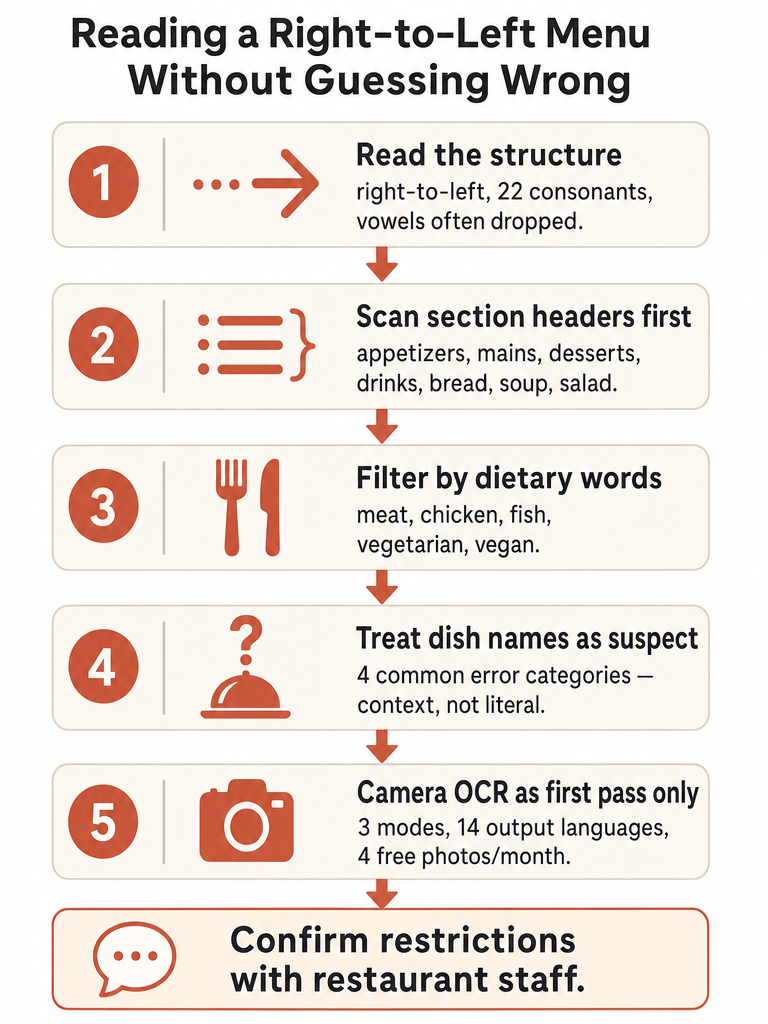
Reading a Hebrew menu starts with structure, not vocabulary. Hebrew runs right to left, and the script uses 22 consonants with vowels often left out entirely on modern menus (Source: Talkpal). That means a short-looking word can carry a lot of meaning, and recognizing root letters matters more than sounding out every character.
Here's the workflow that keeps you from guessing wrong:
Read right to left. Your eyes start at the top-right of the page, not the left.
Scan section headers first. Talkpal recommends orienting around the big category labels before you commit to any single dish.
Translate the category and dietary cues before the dish names. Knowing a section is fish or vegetarian narrows your choices fast.
Treat dish-name output as a starting point, not the final answer. A literal rendering often misses what's actually on the plate.
The reason this order works is simple: section headers and dietary words are stable and predictable, while individual dish names are where literal translation goes sideways. Get the structure first, then drill into specific dishes once you know what part of the menu you're in.
What are the major sections of a menu to translate first?
The fastest path through a Hebrew menu is to find the section headers before you read a single dish. Talkpal advises orienting around these category labels first, because they tell you where to focus and what to skip. A menu that looks dense becomes manageable once you've located which block holds the food you actually want.
The supported menu sections worth recognizing first:
Section type
What it covers
Appetizers
Starters, small plates
Soup / Salad
Lighter openers
Bread
Bread and bread-based items
Main courses
The core of the meal
Meat / Chicken / Fish
Protein-based mains
Vegetarian / Vegan
Plant-based options
Desserts
Sweets and end-of-meal items
Drinks
Beverages
Find the section that matches your meal, then read only the dishes inside it.
Scanning this way means you never have to translate the whole menu word by word. You jump to the block you need, then narrow down. For travelers and learners, this is the difference between standing frozen at the counter and ordering with confidence in under a minute. Translate the categories and dietary words first, and the rest of the menu stops being intimidating.
Which Hebrew menu labels tell you meat, chicken, fish, vegetarian, or vegan?
Your first filter on any Hebrew menu should be the protein and dietary labels: meat, chicken, fish, vegetarian, and vegan. These are the words that decide whether a dish is even an option for you, before taste or price ever come up. Talkpal's menu vocabulary covers these basic ingredient and dietary categories as the foundation for reading any Israeli menu.
Knowing these labels does the heavy lifting:
If you eat plant-based, the vegetarian and vegan sections tell you where to look immediately.
If you avoid certain proteins, the meat, chicken, and fish labels rule whole blocks of the menu in or out.
If you're scanning fast, these words appear often enough that recognizing even a few keeps you oriented.
The corpus supports these basic categories, and that's where we'll stop. There's no reliable deep glossary here for every ingredient, sauce, or preparation term, so don't treat a handful of recognized words as a full menu translation. Use the labels to filter, then confirm specifics another way.
How to translate a foreign menu when Hebrew dish names are not literal?
Hebrew dish names rarely survive a word-for-word translation, which is exactly why menus trip people up. MotaWord warns that literal Hebrew-to-English translation can be technically correct yet awkward, unclear, or misleading, because Hebrew words and expressions often carry multiple possible English meanings. A dish name is meaning plus culture, not a string of words to swap one at a time.
MotaWord groups most Hebrew-to-English errors into 4 categories: grammar and syntax differences, literal word-for-word translation, misreading context or tense, and missing cultural nuance (Source: MotaWord). Menu names hit at least two of those at once.
Consider the dishes Talkpal lists for Israeli menus:
Hummus, falafel, shakshuka, sabich, shawarma — these are names, not descriptions. A literal breakdown tells you almost nothing about what arrives on the plate.
Borrowed words like פיצה (pizza) are the easy case — familiar-looking and safe to recognize on sight.
The takeaway: when a dish name is a proper culinary term, don't trust a literal rendering. Context-aware translation that preserves meaning and cultural intent beats a dictionary-style swap every time. Sentence-level meaning over word-by-word output is the whole point.
Hebrew menu reading vs camera translation: which should you trust first?
Trust structure-first reading for the big decisions, and camera translation for the details. Manual reading — scanning section headers and dietary labels — gets you to the right part of the menu fast and never depends on signal or app quality. Camera OCR is the better first pass for individual dish names, especially the ones you don't recognize. The two work best together, not as rivals.
Here's how to decide which to lean on:
Situation
Reach for
Why
Finding the right section
Manual reading
Headers are predictable; faster than a photo
Filtering by diet
Manual reading
Meat/fish/vegan labels are stable words
Unfamiliar dish names
Camera translation
OCR handles full phrases faster than you can
Weird or incomplete output
Second check
Re-shoot, or confirm with staff
Allergy or kosher status
Restaurant staff
Never an app's job alone
Use camera translation as a first pass, not the final word — when output looks off, verify it.
A literal or garbled dish translation is your signal to slow down. It usually means the tool hit a named dish (like sabich or shakshuka), a stylized font, or a dim photo. Re-read the section header, re-shoot if needed, and for anything safety-critical, ask. The camera narrows the question; it doesn't close it.
How does photo menu translation work for Hebrew menus?
Photo menu translation works by reading the Hebrew text out of an image, then translating it — and Hebrew makes that harder than most languages. You point your camera at the menu or pick a photo, and an OCR layer has to handle right-to-left text, vowel marks (nikud), final-letter forms, column layouts, and the ornate fonts restaurants love. Get the OCR wrong and every translation downstream is wrong too.
baba Hebrew Translator's camera page describes how its OCR layer reads Hebrew right-to-left, handles nikud and final-letter forms, and copes with the column layouts common on signs and menus (Source: baba). The same page lists the specifics:
3 translation modes: Summary, Literal, and Signs/Parking
14 output languages
4 free photo translations per month, with no login and no credit card
Extracted text runs through 2,700+ HebrewCore prompts that resolve gender, register, and idioms
That last step is what separates a Hebrew-first tool from generic OCR. Reading the letters correctly is only half the job; resolving gender and idioms is how the output sounds native instead of robotic. For a dim restaurant or a hand-lettered chalkboard, baba's Pro High Detail mode runs a slower second pass aimed at handwriting and ornate fonts (Source: baba). For everyday menus, the free tier and Literal mode usually do the trick.
When should you confirm dietary restrictions with restaurant staff instead of relying on an app?
Confirm with restaurant staff any time the answer affects your health or your religious practice — allergies, kosher status, dairy-meat separation, gluten, nuts, or strict vegan preparation. An app's dietary estimate is a helpful flag, not a verdict. The Menu Translator App listing itself states that users should always confirm with the restaurant if a dish fits their dietary requirements (Source: Menu Translator App, Google Play).
That app's listing offers dietary estimates across vegetarian, vegan, halal, kosher, pescatarian, gluten-free, and lactose-free options — useful for narrowing choices, but explicitly framed as estimates, not guarantees (Source: Menu Translator App).
So treat the app and the server as two different jobs:
App's job: flag likely options, explain unfamiliar dishes, speed up your shortlist.
Staff's job: confirm what's actually in the kitchen — cross-contamination, shared fryers, hidden dairy, how a dish was truly prepared.
For anything safety-critical, the restaurant staff is the source of truth — the app just gets you to the right question faster.
The sources here don't cover Israeli menu-labeling rules or Hebrew phrases for confirming allergens with a server, so public guidance on the exact wording is limited. Until then, ask directly and don't assume a printed label settles it.
Which app claims and privacy tradeoffs matter before uploading Hebrew menu photos?
Before you upload a menu photo, separate verified claims from soft proof and check what the app does with your data. The Menu Translator App by TravelFeed, listed on Google Play, advertises translations and explanations of dishes in 80+ languages and shows 10K+ downloads with a 5.0 rating (Source: Menu Translator App, Google Play). Useful context — but read the data-safety section before the marketing.
The same listing's data-safety notes are the part that matters:
The app may share Location and Photos and videos with third parties
It may collect Device or other IDs
Data is encrypted in transit
The app does not allow data deletion
One more reason to stay skeptical of headline numbers: the listing shows 287 reviews near the header and 284 reviews in the ratings section — inconsistent on the same page (Source: Menu Translator App). Don't lean on a precise review count as proof of anything.
Other tools sometimes named in this space — Linnk AI, TopFood, Afirstsoft, Scale to Grams — aren't documented in the sources here, so there's nothing verifiable to compare. Public detail on them is limited as of this writing.
Where Hebrew menus connect to signs, WhatsApp, and travel phrases in Israel
A Hebrew menu is one slice of a bigger pattern: in Israel, you're translating whole situations, not isolated words. The same instinct that gets you through a menu — read the structure, skip the literal word-swap, confirm what matters — carries over to street signs, WhatsApp threads, and the phrases you'll actually say out loud.
If menus are your starting point, these guides pick up the rest of the real-life pattern:
The thread through all of it is the same one this guide started with: translate meaning, not characters. Ready to handle the next sign, chat, or menu in real time? Try the free web translator and speak like a local, not a bot.
Frequently asked questions
Why do Hebrew dish names come out wrong when I translate them literally?
Hebrew dish names are culinary proper nouns, not descriptive phrases — so a word-for-word swap produces nonsense or misleading output. MotaWord identifies four failure modes in Hebrew-to-English translation: grammar and syntax differences, literal word-for-word output, misread context or tense, and missing cultural nuance. Dishes like shakshuka, sabich, and shawarma are names, not ingredient lists. When a translated dish name reads like gibberish, search the name itself rather than re-reading the literal output.
What Hebrew menu sections should I translate first to find food fast?
Start with section headers, not individual dishes. Category labels — appetizers, main courses, meat, chicken, fish, vegetarian, vegan, desserts, drinks — tell you which block of the menu applies to you before you read a single dish name. Translating those headers first means you skip irrelevant sections entirely and jump straight to the choices that matter, cutting a dense menu down to a manageable shortlist in under a minute.
How does photo menu translation handle Hebrew's right-to-left script and missing vowels?
Hebrew OCR has to manage right-to-left text direction, missing vowel marks (nikud), final-letter forms, and the ornate fonts common on restaurant menus — get any of those wrong and every translation downstream fails. baba Hebrew Translator's camera feature reads Hebrew right-to-left, handles nikud and final-letter forms, and runs extracted text through 2,700+ HebrewCore prompts that resolve gender, register, and idioms before you see the output. For dim lighting or handwritten menus, a High Detail mode runs a second pass aimed at ornate fonts and handwriting.
When should I confirm dietary restrictions with restaurant staff instead of trusting a translation app?
Always confirm with staff when the answer affects your health or religious practice — allergies, kosher status, dairy-meat separation, gluten, or nuts. The Menu Translator App's own listing states users should always confirm with the restaurant whether a dish fits their dietary requirements, framing its dietary estimates as estimates, not guarantees. A photo translation reads what's printed; it can't see the kitchen, check for cross-contamination, or know what touched a shared fryer.
Should I use manual reading or camera translation to navigate a Hebrew menu?
Use both for different jobs. Manual reading — scanning section headers and dietary labels — is faster for finding the right part of the menu and never depends on app quality or signal. Camera translation is better for individual dish names you don't recognize, where OCR handles full phrases faster than you can. If the camera output looks garbled, it usually hit a named Israeli dish, a stylized font, or a dim photo — re-shoot or confirm with staff.
What privacy tradeoffs should I know before uploading a Hebrew menu photo to a translation app?
Check the data-safety section before the marketing. The Menu Translator App by TravelFeed on Google Play discloses that it may share location and photos/videos with third parties, may collect device IDs, and does not allow data deletion. For a public restaurant menu that's low risk; for any photo with personal detail in frame, it's worth pausing. Encrypted transit protects data in motion, but no-deletion policy means uploaded images may persist indefinitely.