Translate Hebrew signs fast with a camera: read right-to-left text, choose Summary, Literal, or Signs/Parking, and verify the rule before acting.
How to translate Hebrew signs fast
The fastest way to translate a Hebrew sign is to photograph it and let a camera-based OCR tool read the right-to-left text for you. Typing Hebrew by hand is slow and error-prone for travelers, and it breaks down on unvoweled sign text. On baba's camera translator page, the free tier includes 4 photo translations per month with no login and no credit card.
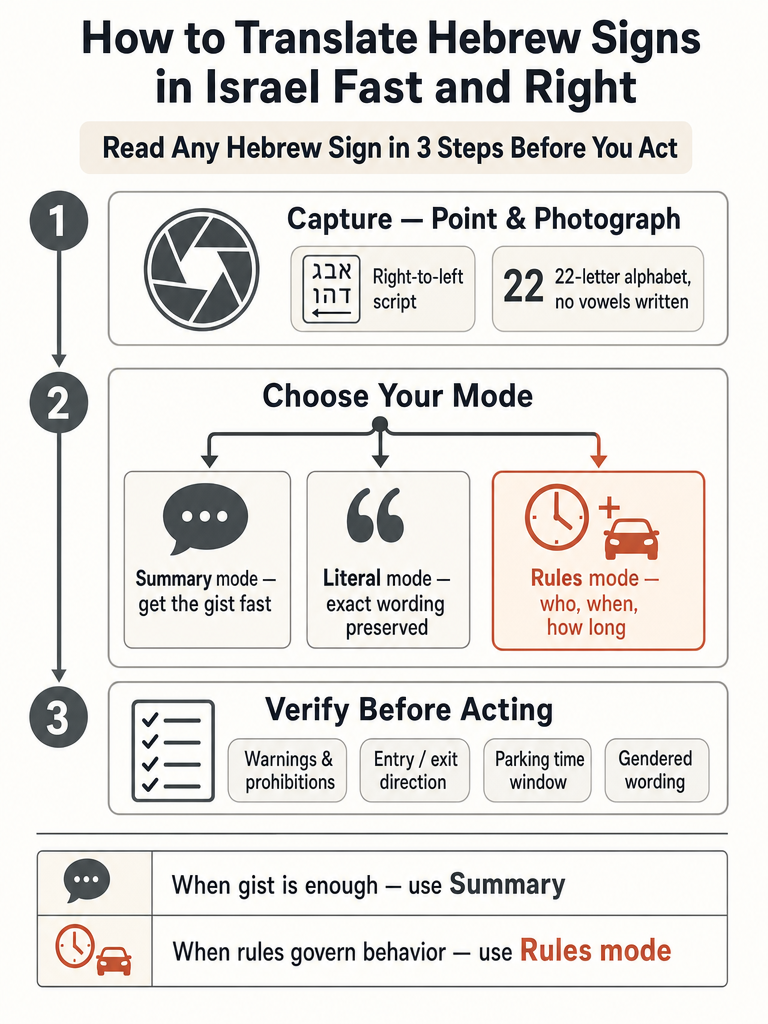
Here's the workflow that gets you a trustworthy read in seconds:
Photograph the sign straight-on, filling the frame, with the whole line of text visible.
Let the OCR read it. baba's camera translator describes handling Hebrew right-to-left text, vowel marks (nikud), and final-letter forms, plus column layouts common on signs and menus.
Pick your output style. Choose based on whether you need the gist or the exact rule.
Verify the rule-critical detail before you act. Check the parking window, the warning, the entrance or exit direction, and any gendered wording that changes who the sign addresses.
A sign photographed on a wall gives you no context clues a human reader would use, which is exactly why a straight-on, full-frame photo matters more than it seems.
Can I translate Hebrew signs with my phone camera?
Yes, a phone camera is the fastest path for almost any Hebrew you can photograph. Signs, restaurant menus, product packaging, ministry PDFs, parking notices, and even WhatsApp screenshots all work better through a camera than through hand-typing. baba's camera translator is positioned exactly for these cases, and its free tier includes 4 photo translations per month.
Typing Hebrew yourself is the slow option for two reasons. First, most travelers and beginners don't have a Hebrew keyboard or know the layout. Second, Hebrew on Israeli signs usually appears without vowels, so even copying letters correctly leaves you guessing at the word.
A camera skips all of that. You point, shoot, and the OCR reads the letters in the right direction for you.
Lesson 1: The Hebrew Alphabet | Crash Course in Hebrew Reading & Pronunciation
From The WORD in HEBREW on YouTube
How do you read Hebrew signs from right to left?
Hebrew reads right to left, the opposite of English, so the first letter of a word sits on the right edge and the last letter on the left. Judaism 101 (JewFAQ) confirms that Hebrew is written right-to-left, with Alef (א) as the first letter and Tav (ת) as the last. The Hebrew alphabet has 22 letters.
Three quirks trip up new readers, and each one affects how a translation lands:
No vowels. JewFAQ notes that most things written in Hebrew in Israel appear without vowels. Fluent readers don't need them, but a word-matching tool has less to work with.
Final-letter forms. Five letters change shape at the end of a word: Kaf/Khaf (כ ך), Mem (מ ם), Nun (נ ן), Pei/Fei (פ ף), and Tzadei (צ ץ). The same letter can look different depending on its position, which confuses naive lookups.
Pronunciation aids. JewFAQ describes nikkud, a system of dots and dashes added above, below, or inside letters to mark vowels in "pointed" text. You'll rarely see it on street signs.
A good Hebrew sign translator has to read right-to-left, resolve unvoweled words, and recognize final-letter forms before it can even attempt the meaning.
Why do Hebrew signs lose meaning in word-for-word translation?
Word-for-word translation fails on Hebrew signs because the language shifts based on context, gender, and formality. A literal match can name the words correctly and still miss who the sign addresses or what rule it gives. baba's blog on reading Hebrew street signs explains that street signs, menus, and messages are hard to translate for exactly this reason.
Gender is the biggest trap. Hebrew grammar is deeply tied to it: verbs, adjectives, and nouns must align with the gender of the person being addressed, according to baba's street-signs guide. A notice worded for a man reads differently than one worded for a woman, and a tool that ignores this produces output that sounds off or points to the wrong person.
Unvoweled text makes it worse. Without vowels, one string of consonants can map to several words, so the translator has to infer meaning from the whole sign, not one token at a time. That's why gist and context matter more than isolated matches.
Slang adds another layer. Standard tools often fall behind on modern Hebrew slang because slang changes quickly and many tools rely on static databases, per baba's street-signs guide. The fix is sentence-level translation that reads the full sign and resolves gender and register together. For a deeper look at why this matters, see how gender shapes Hebrew translation accuracy.
Summary vs Literal vs Signs/Parking: which mode should you use?
Pick your mode by what you need from the sign: the gist, the exact wording, or the actual rule. baba's camera translator offers three image translation modes, and matching the mode to the situation is what keeps you from acting on a bad read. The product's page describes all three.
Mode
Best for
What it gives you
Summary
Getting the gist fast
A plain-language read of what the sign is about
Literal
Menus, official notices, exact wording
The precise words as written
Signs/Parking
Parking and rule signs
Who, when, and how long, plus a one-line verdict
Use Summary when you just need to know whether a sign is a warning, a store hours notice, or a direction. It's the fastest way to orient yourself without sweating every word.
Use Literal when the exact wording carries weight, like a menu item you're allergic to or an official notice where a specific phrase changes what you should do.
Use Signs/Parking when the sign is a rule you have to obey. baba's Signs/Parking mode focuses on the rules on Israeli parking signs, when, who, and how long, and gives a one-line verdict, per the camera translator page.
The mode you choose is the difference between reading a sign and following it correctly. When money or a fine is on the line, gist isn't enough.
How to translate parking signs in Israel
Parking signs in Israel demand rule-focused translation, because the words only matter if you can extract the condition, the time window, and who it applies to. baba's camera translator describes a dedicated Signs/Parking mode built for this, giving a one-line verdict on when, who, and how long.
Work through a parking sign in this order:
Photograph the whole sign, including any arrows, colored bars, and smaller print under the main line.
Run it in Signs/Parking mode so the output targets the rule, not a paraphrase.
Read the condition first: is parking allowed, restricted, or forbidden here?
Find the time window: which hours or days does the rule cover?
Check who it applies to: residents, permit holders, everyone, or a specific vehicle type.
Confirm the duration: how long you can stay before you're in violation.
Then act on the one-line verdict, but only after you've eyeballed the details yourself.
Public detail on official Israeli signage standards is limited in the sources here, so treat any translation as a strong read to verify, not a legal ruling. When a fine or tow is possible, confirm the window and the condition before walking away.
What should you check before trusting a Hebrew sign translation?
Before you act on a Hebrew sign translation, verify every detail that changes what you do next. A translation can be broadly right and still leave you doing the wrong thing if it misses a time window, a direction, or the gender the sign addresses. This trust-the-result check takes ten seconds and saves real trouble.
Run through this list on any sign that carries a consequence:
Warnings and prohibitions. Confirm whether the sign forbids something before you assume it's just informational.
Entrances and exits. Directions matter; entering through an exit or vice versa is a common mistake.
Parking windows. Check the hours, days, and duration, not just whether parking is allowed at all.
Official notices. Ministry and municipal wording is formal; verify deadlines, amounts, and eligibility lines.
Gendered wording. Hebrew verbs and adjectives align with the gender of the person addressed, per baba's street-signs guide, so confirm the notice is aimed at you.
Anything numeric. Times, prices, and dates are the details a quick read is most likely to garble.
If a detail on the sign changes what you should do next, verify it before you act, not after. For official forms and government pages specifically, how to translate Hebrew forms and government websites walks through checking deadlines and eligibility line by line.
How accurate is Hebrew OCR on real-world photos?
Printed Hebrew reads at very high accuracy in baba's camera translation flow, but real-world sign photos vary a lot. baba's camera translator page states that printed Hebrew is recognized at very high accuracy, while handwritten Hebrew, ornate fonts, and weathered street signs are harder. Clean, printed, straight-on text is the easy case; everything else needs care.
Expect trouble with a few photo conditions. Handwriting throws off the letter shapes OCR expects. Decorative or ornate fonts distort the strokes. Weathered, faded, or damaged signs lose detail the reader needs. Practical failure modes also include blurry, tilted, glare-heavy, and low-light photos, where the letters simply aren't sharp enough to resolve.
What to do when a read looks wrong:
Retake the photo straight-on, closer, and in better light.
Cut glare by changing your angle rather than using flash.
Steady your hands or brace the phone to kill blur.
For a faded or ornate sign, verify the key detail another way before acting.
Independent benchmarks comparing Hebrew sign OCR across tools on real Israeli signage aren't in the sources here, so treat any single read on a hard photo as a strong guess to confirm.
Camera translation vs typed text vs single-word lookup: which fits Hebrew signs?
For photographed Hebrew signs, camera OCR wins; typed translation and single-word lookup fit different jobs. Each category solves a real problem, but only camera OCR reads a sign you can't type. Matching the tool to the task keeps you from forcing the wrong one.
Tool type
Best fit
Notes
Camera OCR
Photographed signs, menus, packaging
Reads right-to-left, unvoweled text; baba's camera translator handles nikud and final-letter forms
Paste-based translation
Typed or copied text
Lingvanex says its English-to-Hebrew tool allows up to 3,000 characters at once
Single-word lookup
Isolated terms, roots, conjugations
Good for one word, too limited for a full sign
Paste-based tools are fine when you already have the text digitally. Lingvanex allows up to 1,000 requests a day on its English-to-Hebrew web tool. Single-word dictionaries answer "what does this one word mean" but can't handle a sentence-length sign with gender and context baked in.
For a sign, though, the whole point is that you can't type it. That's where camera OCR earns its place. If your main need is single words versus real sentences, baba vs dictionary-only Hebrew tools for real sentences breaks down where each approach fits.
Frequently asked questions
Can I translate Hebrew signs with my phone camera?
Yes — photographing a sign is faster and more accurate than hand-typing for nearly every real-world case. baba's camera translator reads right-to-left, unvoweled Hebrew and handles final-letter forms that trip up generic tools. The free tier includes 4 photo translations per month with no login required. Street signs, menus, parking notices, and even WhatsApp screenshots all work better through a camera than a keyboard.
Why do Hebrew signs lose meaning in word-for-word translation?
Hebrew grammar is gender-dependent: verbs, adjectives, and nouns shift based on who the sign addresses. A literal match can name every word correctly and still point to the wrong person or miss the actual rule. Unvoweled text compounds this — one consonant string can map to several words, so the translator has to read the full sign for context, not token by token.
How do you read Hebrew signs from right to left?
Hebrew reads right to left, so the first letter of every word sits on the right edge. The alphabet has 22 letters, and most signs appear without vowels — fluent readers don't need them, but visitors do. Five letters also change shape at the end of a word (Kaf, Mem, Nun, Pei, Tzadei), so the same letter can look different depending on position, which confuses naive word-matching tools.
Which translation mode should you use for Israeli parking signs?
Use Signs/Parking mode, not Summary. baba's camera translator offers a dedicated Signs/Parking mode that extracts the condition, time window, who it applies to, and how long — then delivers a one-line verdict. Summary mode gives you the gist; Signs/Parking gives you the rule. When a fine or tow is possible, gist isn't enough.
How accurate is Hebrew OCR on real-world sign photos?
Printed Hebrew reads at high accuracy in clean, straight-on photos. Accuracy drops with handwriting, ornate or decorative fonts, weathered signs, glare, blur, and low light. To get the best read: fill the frame, shoot straight-on, and cut glare by changing your angle rather than using flash. For faded or damaged signs, verify the key detail another way before acting on the translation.
What should you double-check before trusting a Hebrew sign translation?
Verify any detail that changes what you do next: warnings and prohibitions, entrance vs. exit direction, parking hours and duration, deadlines on official notices, and anything numeric. Hebrew verbs and adjectives align with the gender of the person addressed, so confirm the notice applies to you. A translation can be broadly right and still send you the wrong way if one conditional or time window gets garbled.